FIDO Vault
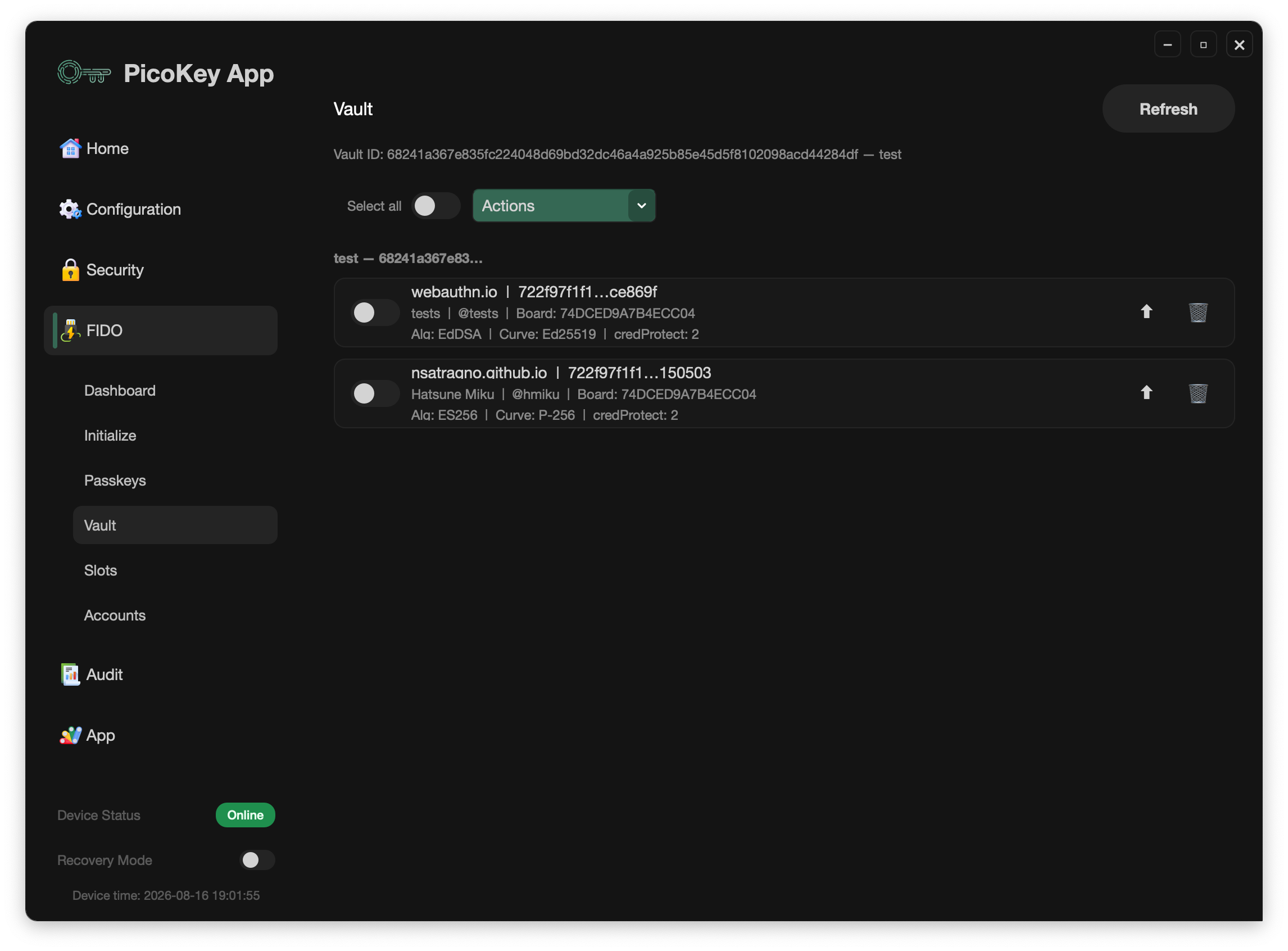
The FIDO > Vault panel manages local backups of credentials exported from an enrolled Pico FIDO device. It is the desktop part of the Pico Vault workflow; it does not enroll a board.
Before opening the panel
- Register the board in PicoKey App.
- Install and run the standalone
pico-vault-enroller. - Enroll the board with an encrypted enrollment envelope.
- Unlock FIDO > Passkeys with the device PIN.
Select FIDO > Vault and click Refresh. The panel shows the Vault ID when the board is enrolled. If it is not enrolled, the panel points to the standalone enroller.
The local store may contain packages from multiple Vault IDs. The panel groups them by Vault ID and shows the active board's Vault ID at the top.
Export a passkey
From FIDO > Passkeys, choose one or more resident credentials and select an export profile:
ChaChaPolyAES-GCMChaChaPoly + AES-GCMAES-GCM + ChaChaPoly
Use the credential's Vault export action or Export selected. The app saves the opaque Vault package and display metadata in its local Vault store. A credential already stored in the active Vault is not exported again.
The local store can display the relying party, user information, algorithm, board serial, and Vault ID. It does not turn the package into a plaintext private key.
Import a passkey
On the destination board:
- Enroll it with the same enrollment envelope.
- Unlock FIDO > Passkeys.
- Open FIDO > Vault and click Refresh.
- Select a credential and use its import button, or choose Import selected.
Only packages whose Vault ID matches the active board can be imported. A package from another Vault remains visible in its group but its import action is disabled. Imported credentials are shown in the destination's passkey list as separate resident credentials.
The same encrypted enrollment envelope can be used to enroll multiple boards. Those boards report the same Vault ID and can exchange exported credentials through the same Vault domain. Create a new envelope only when a separate Vault domain is intended.
Use Select all and Import selected for a bulk import from the active Vault group. The panel also provides an import button for each eligible row.
Delete local Vault records
The row delete button and Delete selected remove packages from the local Vault store. They do not delete a credential already imported into a board. Deleting the local package is therefore a backup-store operation, not a device credential-management operation.
Security and recovery
Keep the enrollment JSON, its passphrase, device PIN, and exported packages under separate protection. The App cannot reset a lost enrollment passphrase. If a package or enrollment secret is exposed, treat it as a recovery incident and rotate the Vault domain according to the Vault operations guide.