Slot: Static Password
This page describes the Static Password slot type available in PicoKeyApp.
The Static Password slot stores a fixed password that is emitted by the device as keyboard input when triggered.
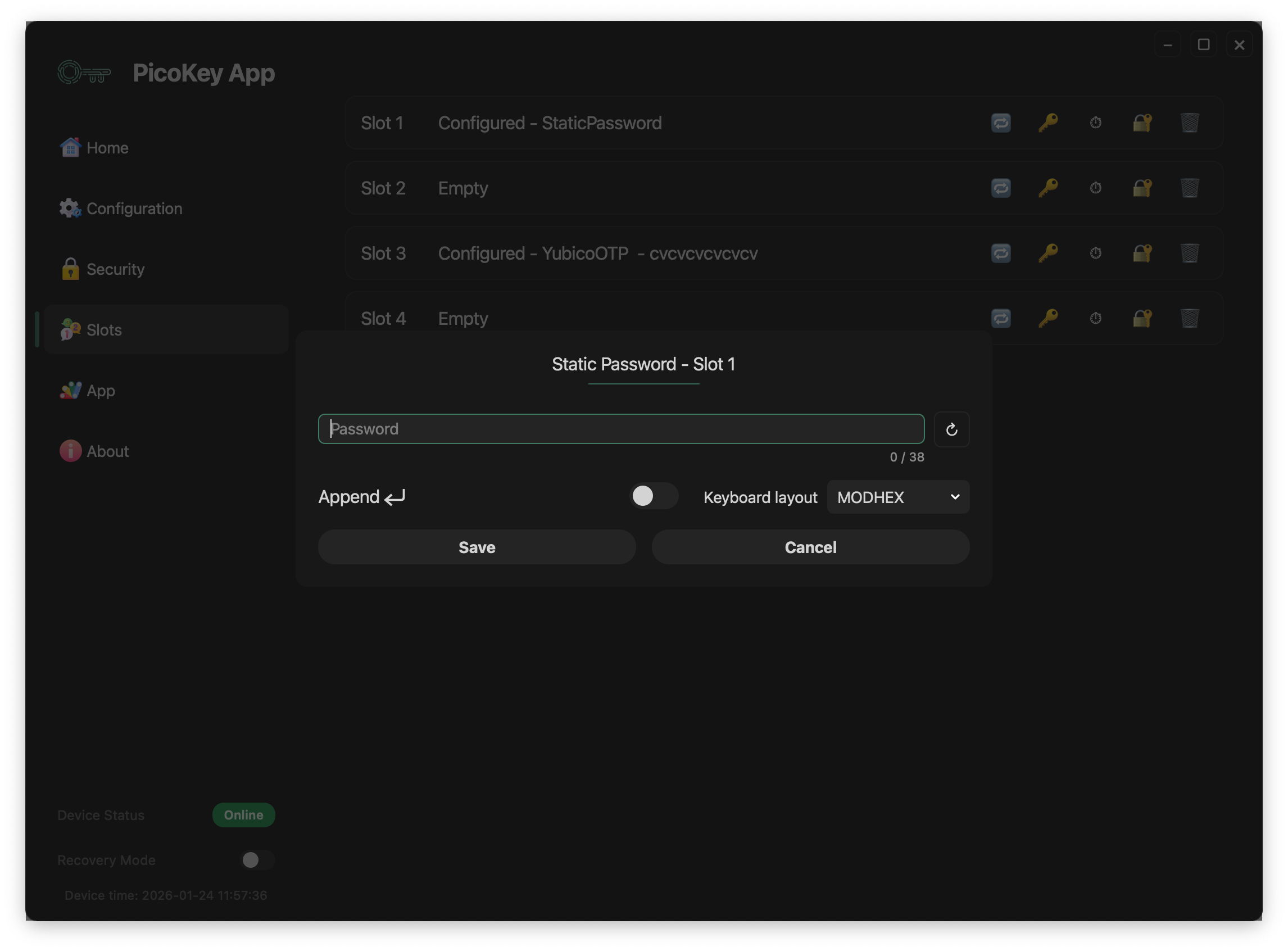
Overview
The Static Password slot allows the device to:
- Store a static password securely
- Emit the password as keystrokes
- Behave as a USB keyboard when activated
This mechanism is compatible with systems that accept keyboard input.
Activation mechanism
The Static Password slot is activated through the OTP / button interface.
Activation works as follows:
- The user presses the BOOTSEL button N times
Ncorresponds to the slot number- Once activated, the device types the stored password
- The password is sent as if typed on a physical keyboard
Note
No software on the host is required beyond standard USB HID keyboard support.
Slot configuration
Password
Defines the static password stored in the slot.
- The password is stored securely on the device
- The password cannot be retrieved once stored
- The maximum length is limited by the slot implementation
Warning
Losing the password means it cannot be recovered from the device.
Append Enter
When enabled:
- A newline (Enter key) is sent after the password
- Useful for automatic form submission
Tip
Enable this option when logging into terminals or login forms.
Keyboard layout
Defines how characters are translated into keyboard scancodes.
- Different layouts affect how characters are typed
- The selected layout must match the host system keyboard layout
Warning
A mismatched keyboard layout may produce incorrect characters.
Save and cancel
- Save stores the password permanently in the slot
- Cancel discards the configuration
Danger
Saving overwrites any existing slot configuration.
Security considerations
The Static Password slot:
- Does not expose the password over software interfaces
- Emits the password only as keyboard input
- Can be triggered without host authentication
Warning
Anyone with physical access to the device may trigger the slot.
Typical use cases
Common use cases include:
- Login to systems without password managers
- Unlocking encrypted volumes
- Entering recovery passwords
- Automating repetitive authentication steps
Tip
Use Static Password slots only on trusted systems.
Limitations
- No challenge-response
- No host-side verification
- Password is static
- Susceptible to shoulder surfing or screen recording
Note
This slot prioritizes convenience over cryptographic authentication.